
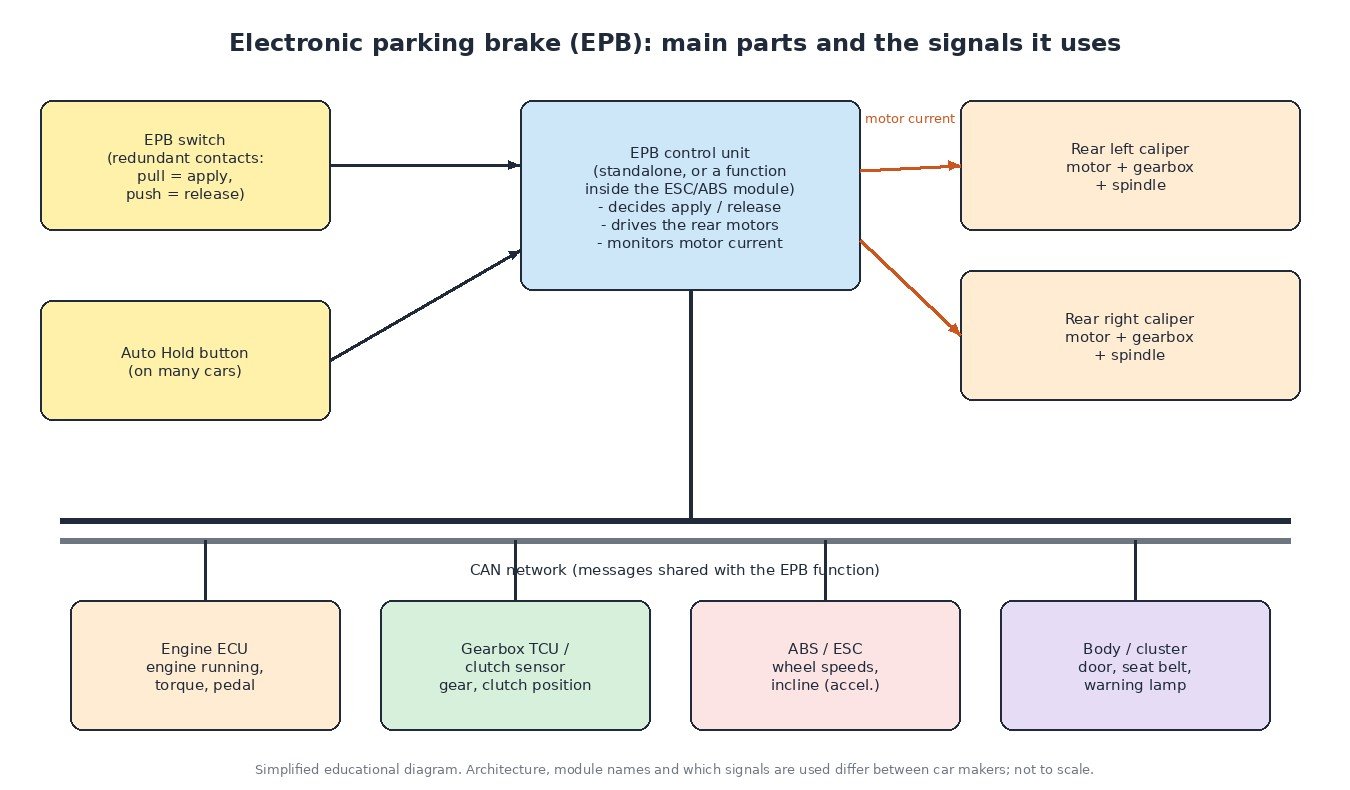
The hand brake lever has disappeared from most new cars. In its place is a small switch on the centre console and two electric motors on the rear brakes. The electronic parking brake (EPB) looks simple from the driver’s seat, but it is a networked system that talks to the ABS/ESC unit, the engine ECU, the gearbox and the body electronics. This article explains how an EPB is built, how the control unit decides when to apply and release, what Auto Hold does, and how to diagnose the faults that workshops see most often.
Why carmakers moved to electric parking brakes
A mechanical hand brake needs a lever, cables and regular adjustment. An EPB frees space in the cabin, keeps its clamping force consistent without the driver pulling hard, and, most importantly, can be controlled by software. That makes functions possible that a cable lever cannot offer: automatic release when you drive away, hill holding, automatic apply when the engine is switched off on some models, and emergency braking through the switch if the main brake pedal cannot be used.
The two main actuator designs
Cable-puller systems
Early and some current designs keep conventional parking brake cables to the rear brakes. A central actuator, usually mounted under the car near the rear axle, contains an electric motor and gearing that pulls the cables. The rear brakes themselves stay largely conventional, which is why this layout also suits rear drum brakes and drum-in-hat designs.
Motor-on-caliper (MoC) systems
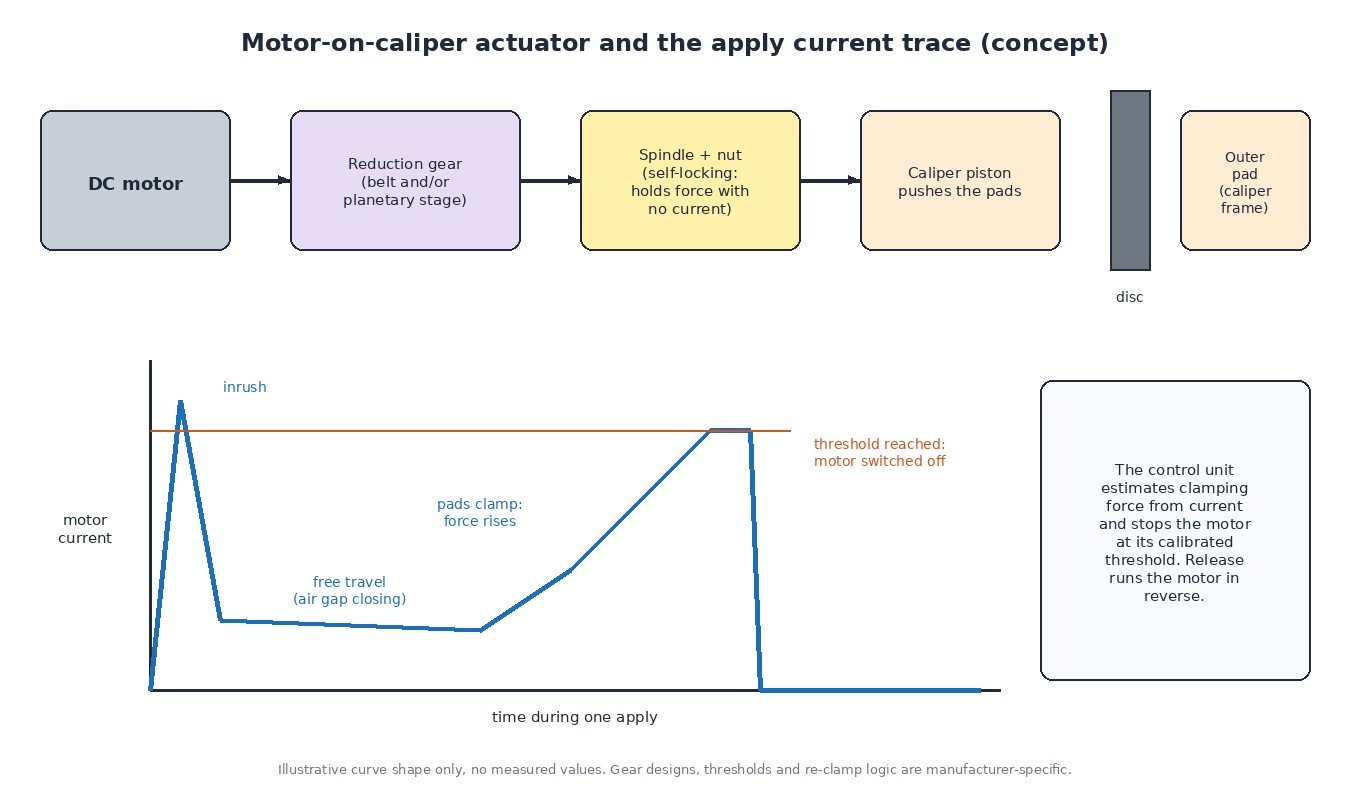
The most common layout today puts a motor and gear unit directly on each rear caliper. The motor drives a reduction stage (belt and/or planetary gears) which turns a spindle inside the caliper piston. A nut on the spindle pushes the piston and pads against the disc. The spindle thread is self-locking, so once the force is built up the motor can be switched off and the brake stays applied with no current. To release, the control unit runs the motor in reverse.
The same caliper piston is used by the normal hydraulic service brake. That is why the rear pistons on a motor-on-caliper EPB must never be forced back with a piston tool before the spindle has been retracted.
How the control unit applies and releases
The EPB function lives either in its own control unit or, on many newer cars, as software inside the ESC/ABS module. The switch normally has redundant contacts, so the control unit can tell a genuine driver request from a single wire fault.
When the driver pulls the switch, the control unit powers both rear motors. It watches motor current: there is an inrush peak, a low-current phase while the pads close the gap, then a steady rise as clamping force builds. When the current reaches the calibrated threshold, the motor is switched off. The current trace therefore doubles as a force estimate and as a diagnostic tool: a motor that never reaches the threshold, or reaches it far too early, points to a mechanical or electrical problem on that side.
Brakes that were hot when the car was parked cool down and the disc shrinks, so clamping force can drop. Many systems handle this with a re-clamp after a delay or under certain conditions. The exact logic is manufacturer-specific.
Drive-away release, Auto Hold and dynamic braking
Automatic release is where the EPB depends on other ECUs. Before releasing, the control unit typically checks signals such as:
- engine running and torque available from the engine ECU,
- accelerator pedal position (see how the ECU uses pedal and brake switches),
- gear engaged, or clutch position on manual cars,
- incline from the longitudinal acceleration sensor,
- door and seat belt status from the body modules.
All of this arrives over the CAN network. The precise conditions differ between makers and models.
Auto Hold is usually an ESC function, not an EPB motor function. At a standstill the ESC hydraulic unit holds brake pressure so the driver can take their foot off the pedal. If the car stays stopped for a long time, or the engine is switched off or a door opens, control is typically handed over to the electric parking brake.
Dynamic emergency braking: if the switch is held while driving, most systems do not simply lock the rear wheels. The ESC builds hydraulic pressure on all wheels with ABS control, and the motors apply the rear brakes only at very low speed or standstill.
Typical symptoms
- EPB warning light or “parking brake fault” message.
- Brake does not release, or releases on one side only.
- Automatic drive-away release no longer works, but the switch still does.
- Grinding or clicking from one rear wheel during apply.
- Faults that appear after battery replacement, pad replacement or a flat battery.
Diagnosis: a practical order
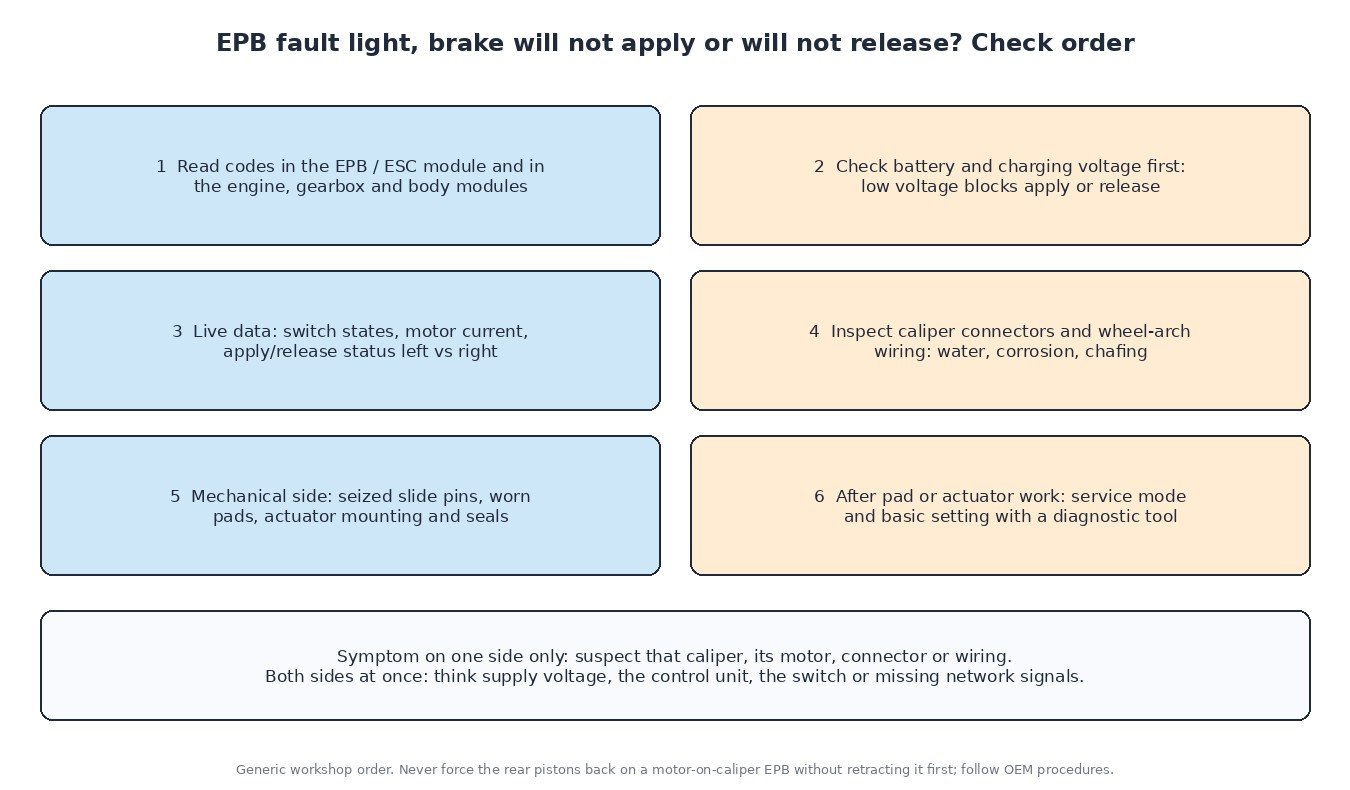
- Read codes from all modules, including ESC/ABS, engine, gearbox and body. Most EPB actuator codes are manufacturer-specific C-codes, while network and voltage problems show up as U- and P-codes in other units.
- Check the battery first. The motors draw high current, and many systems refuse to apply or release at low voltage. A weak battery or poor ground causes intermittent faults. See battery and IBS testing and the voltage drop test.
- Use live data: switch contact states, motor current and apply/release status for left and right. Comparing both sides quickly shows which actuator is the problem.
- Inspect the caliper connectors and wiring in the wheel arch. They live in water, salt and dirt, and corrosion in the connector is common.
- Check the mechanical side: seized slide pins, worn pads, damaged actuator seals or loose mounting screws. A motor can be electrically fine while the caliper is sticking.
- After pad or actuator work, use the diagnostic tool’s service mode to retract the pistons and the basic setting or calibration routine afterwards. Our article on adaptation values and relearn procedures explains why these routines matter.
What this means for ECU tuning
An engine or gearbox calibration does not change the EPB software, but the EPB relies on torque, pedal and gear messages that those ECUs send. A professional file keeps these CAN messages and their meaning unchanged. If drive-away release stops working after any ECU work, check that the correct software and coding are in place and that no U-codes are stored before looking elsewhere.
Related fault codes (DTCs)
EPB actuator and switch faults are usually stored as manufacturer-specific C-codes in the brake or EPB module, so always use service data for those. The generic codes below are the ones that commonly appear alongside EPB complaints.
| Code | Meaning | Typical causes |
|---|---|---|
| P0562 | System voltage low | Weak or failing battery, charging fault, poor ground or supply connection; EPB apply and release may be blocked |
| P0571 | Brake switch “A” circuit | Faulty brake light switch, wiring or connector fault, switch out of adjustment (some cars need the brake pedal pressed to release the EPB manually) |
| P0500 | Vehicle speed sensor “A” | Missing or faulty speed signal; wheel speed sensor, wiring or network message problem affecting automatic release and dynamic braking logic |
| U0121 | Lost communication with anti-lock brake system (ABS) control module | ABS/ESC module without power or ground, CAN wiring fault, water in connectors; on cars where the EPB runs inside the ESC module the whole function is lost |
| U0129 | Lost communication with brake system control module | Brake/EPB control unit not on the network: supply, ground, CAN wiring or internal module fault |
| U0100 | Lost communication with ECM/PCM “A” | Engine ECU messages missing (engine running, torque, pedal); drive-away assist may stop working |
| U0101 | Lost communication with TCM | Gearbox control unit messages missing (gear position), CAN or power supply fault to the TCU |
| U0155 | Lost communication with instrument panel cluster (IPC) control module | Cluster not on the network: EPB warnings and messages cannot be shown, wiring or supply fault |
Generic SAE J2012 / ISO 15031-6 code meanings shown. Which module stores them and how the EPB reacts vary by manufacturer.
Planning a tune for your car, van or truck? Upload your original ECU read to ECUFileMarket and get a file prepared for your exact hardware and software version.